I have successfully reverse engineered a good portion of the Android binary XML file format that is found inside of Android package files (.apk). With this tool, you can explore the XML layout, drawable, and animation files used in the applications distributed with the SDK (phone, browser, contacts, etc). My primary motivation for doing this was to simply observe some of the common practices and get a sense for what Google is doing internally that isn't necessarily available through their API demos and samples. Below you can find two links to download either the stand-alone convertor or the collected output as run over every APK file found in the phone's /system directory:
Download: axml2xml.pl
Download: android-xmldump.tar.gz
Please note that this tool was a very quick hack and some of the XML files I found failed to parse. Not many, and the only ones I found were raw XML documents (not Android resources) so I didn't bother to explore any further incompatibilities. If you find any resources that fail to parse or have any insight into the format, feel free to leave a comment and I will investigate when I have time.
EDIT 2012-08-22: Android's come a long way since this post. It's now possible to use the aapt tool to read the contents of XML documents (and a whole lot more) of APK files. For example:
android dump xmltree foo.apk AndroidManifest.xml
Wednesday, March 5, 2008


Sunday, March 2, 2008
Custom Android list widget to access large sorted lists on touch devices
I have developed a custom Android widget for
Some things left out with this widget are a smooth scroll to the selected position as well as a finer control for sections that have large item counts themselves. More to come later :)
Here's a screenshot using dummy data:

Download: AlphabetListView.tar.gz
Licensed under the GPLv2.
EDIT 2012-08-22: This approach represents very old design patterns for Android and has been broadly replaced by upstream components such as the fast scroll mode of ListView.
m5-rc14 that automatically (and efficiently) sections a sorted list by alphabet letters and offers a side-bar widget for quickly jumping to each section. This widget could be very useful for any project offering an extremely large list to the user, such as a music player showing artists or albums.Some things left out with this widget are a smooth scroll to the selected position as well as a finer control for sections that have large item counts themselves. More to come later :)
Here's a screenshot using dummy data:

Download: AlphabetListView.tar.gz
Licensed under the GPLv2.
EDIT 2012-08-22: This approach represents very old design patterns for Android and has been broadly replaced by upstream components such as the fast scroll mode of ListView.
Sunday, February 10, 2008
Android Eclipse Plugin / AIDL bugs
UPDATE: This work-around is no longer necessary since
The current Android SDK (
To use the script, enter your Android SDK tools directory and issue the following:
Then save the following script as
m5-rc14 fixed the aidl bugs.The current Android SDK (
m3-rc37a) has numerous bugs surrounding the aidl parser, the most annoying of which makes it very difficult to work with a project utilizing aidl imports and the Eclipse Android plugin. In order to ease some frustrations, I have created a wrapper around the aidl tool which tries to guess certain usage parameters and automatically inject the necessary -I switch.To use the script, enter your Android SDK tools directory and issue the following:
mv aidl aidl.googleThen save the following script as
aidl:#!/usr/bin/perl
my @aidl = split /[\/\\]/, [ grep { /\.aidl$/ } @ARGV ]->[-1];
foreach (reverse @aidl)
{
last if $_ eq 'src';
undef $_;
}
my $I = join('/', map { $_ if $_ } @aidl);
my @args;
push @args, "-I$I" if $I;
push @args, @ARGV;
system("$0.google", @args);
And finally, set the script executable:chmod +x aidl
Wednesday, January 9, 2008
Asynchronous Service Example
Many folks have been asking about asynchronous services (using the Binder) in Android and I decided to whip up a quick example showing how this is intended to work with the current SDK (m3-rc37a). There are rumors from Google that they will be improving things soon and providing a better example, but in the mean time this example should clear up a lot of the confusion:
AsyncService.tar.gz
UPDATE: The project must be built using ant (not Eclipse) because of an SDK bug regarding the invocation of the aidl tool. There are also reports that even ant won't work on Windows due to yet more bugs in aidl. The code does work as Google intended, though, and in the next SDK release they are committed to having these issues resolved.
UPDATE2: Google released m5-rc14 and, as promised, the bugs are fixed and their included RemoteService example has been updated to show similar functionality.
AsyncService.tar.gz
UPDATE: The project must be built using ant (not Eclipse) because of an SDK bug regarding the invocation of the aidl tool. There are also reports that even ant won't work on Windows due to yet more bugs in aidl. The code does work as Google intended, though, and in the next SDK release they are committed to having these issues resolved.
UPDATE2: Google released m5-rc14 and, as promised, the bugs are fixed and their included RemoteService example has been updated to show similar functionality.
Friday, December 28, 2007
Android VNC, Part Deux
I decided to create my own VNC implementation and have posted code and binaries over at Google Code. There, you'll find instructions for installing and using the VNC server with a Windows Mobile device using .NET VNC Viewer. Here's a low-quality photo I snapped to get you interested:
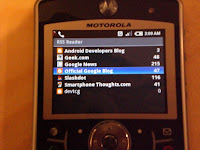
The application running is my Android RSS reader, also hosted by Google Code.

The application running is my Android RSS reader, also hosted by Google Code.
Sunday, December 23, 2007
Android RFB / VNC implementation
Looks like the Android team has created a functional VNC server implementation natively in their surfaceflinger library (/system/lib/libsurfaceflinger.so). After some further exploration, it is possible to actually connect to and use this VNC server, although there are very strict requirements of the client.
First off, you will need to proxy the connection as it only permits connections on the local interface. For this, I have simply cross-compiled a simple TCP proxy and invoked it on the emulator:
Then you must redirect port 5901 on the local machine using the Android telnet interface:
Now you can connect from your local workstation:
Note: the VNC connection will fail if the client suggests any unsupported pixel format (bit depth, endianness(?), etc). So make sure you use -noauto to disable the initial 8bpp performance test and also use a 16bpp native display on your workstation. If your client requests 24 or 32bpp, the server will reject and hang indefinitely. See
A few comments on this implementation:
UPDATE: I have created my own VNC server implementation on Android to work around these problems.
First off, you will need to proxy the connection as it only permits connections on the local interface. For this, I have simply cross-compiled a simple TCP proxy and invoked it on the emulator:
arm-none-linux-gnueabi-gcc -static -o proxy simple-tcp-proxy.c
adb push proxy /data/proxy
adb shell /data/proxy 0.0.0.0 5901 127.0.0.1 5900
Then you must redirect port 5901 on the local machine using the Android telnet interface:
$ telnet localhost 5554
Trying 127.0.0.1...
Connected to localhost.localdomain.
Escape character is '^]'.
Android Console: type 'help' for a list of commands
OK
redir add tcp:5900:5901
OK
Now you can connect from your local workstation:
xvncviewer -noauto localhostNote: the VNC connection will fail if the client suggests any unsupported pixel format (bit depth, endianness(?), etc). So make sure you use -noauto to disable the initial 8bpp performance test and also use a 16bpp native display on your workstation. If your client requests 24 or 32bpp, the server will reject and hang indefinitely. See
adb logcat to determine if you have triggered this behaviour.A few comments on this implementation:
- You may only specify 16bpp pixel format, with the true colour flag on and a 565 bit pattern. This creates problems trying to use it from mobile devices with tools like .NET VNC Viewer which default specifies a 655 bit pattern when you force a 16bpp encoding. I wrote a very simple proxy that understands the RFB protocol and "fixes" some of this brokenness, but the experience is still less than desirable.
- Only the raw encoding is supported, with no incremental updates. This causes atrocious performance problems on the client, making it impractical to use an existing mobile device to interact with the Android RFB server. I tried, it's bad. I think the only real option to proceed would be to extend my proxy to have a deeper understanding of the full RFB protocol, interpretting and re-encoding the data sent from the native Android RFB server. This seems like excessive work, and ultimately is work that should go into the native server. Perhaps I will still do it, though, just to prove it's possible.
UPDATE: I have created my own VNC server implementation on Android to work around these problems.
Saturday, December 1, 2007
Open to the public
I've created a Google Code project at http://android-rss.googlecode.com to host the new Subversion repository for my RSS reader. I will be "releasing" version 0.1 in the near future with a better build environment (ant supported with meaningful dist targets) and a few default feeds preconfigured for easier testing. In the mean time, head on over to the android-rss project to access the code through SVN. Again, for now you must use Eclipse w/ the Android plugin installed or you will not be able to build the source.
Subscribe to:
Posts (Atom)